
Description
An AWS account with credit arrives with a usable balance already applied — $1,000 to $100,000 — sitting in the account before your first login. You draw it down as you consume compute instead of paying Amazon from a card.
Two things make ours different from the identical-sounding listing elsewhere: we tell you the expiry date before you pay, and we sell each account exactly once.
The expiry question, answered before you ask it
AWS credit carries a time horizon. That is not a scandal — it is simply how it works, and every seller in this niche knows it. Remarkably few will tell you before your money has moved.
Ask us for the exact expiry terms on the tier you are considering and we will put them in writing beforehand. Then be honest with yourself about your burn rate, because a balance you cannot consume before it lapses is not a discount. It is a donation.
If your realistic monthly AWS spend is $800, you should be buying a $5,000 tier and not a $25,000 one. We will say so, and lose $1,500 of revenue doing it, because a customer who watched a balance expire unused does not come back.
What is included
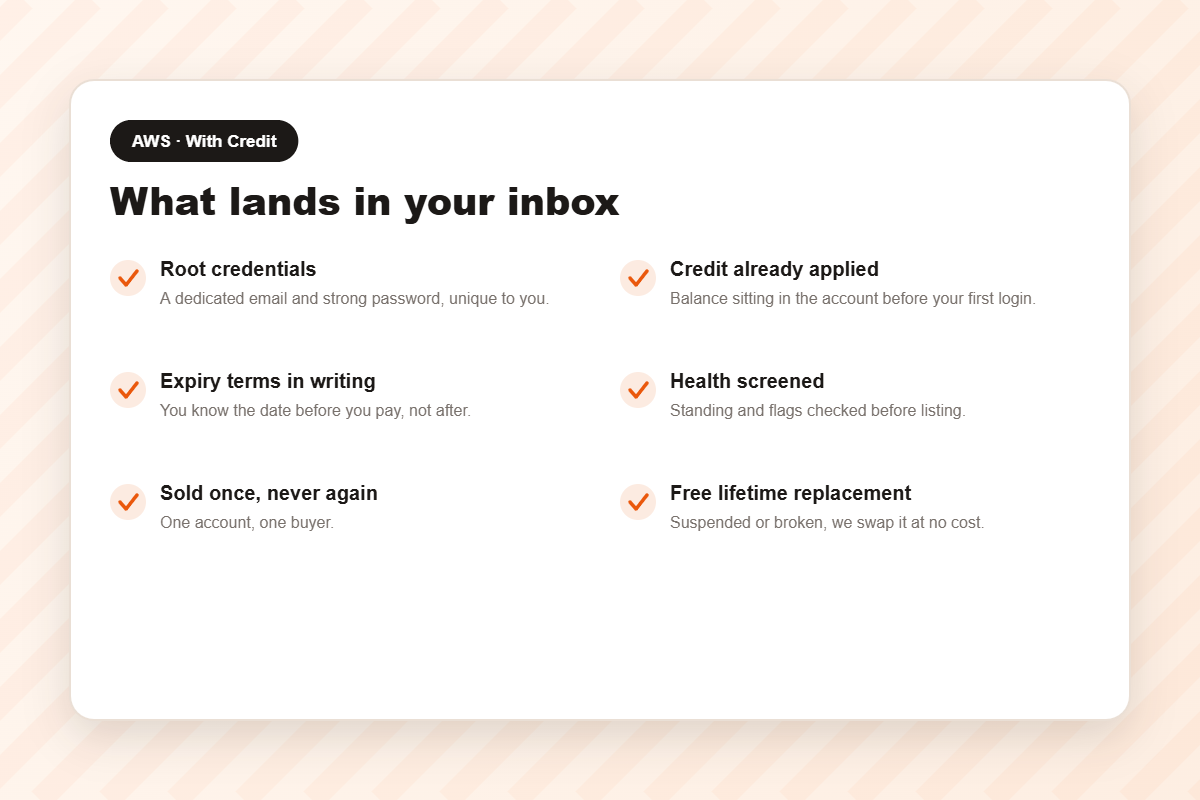
- Root credentials — dedicated email address and strong password.
- The credit, already applied. Nothing to redeem, no code to enter. Visible in the billing console the moment you sign in.
- Expiry terms in writing before you pay.
- Full Console and Cost Explorer access, so you watch the balance draw down in real time.
- Health screening — standing and flags checked before listing.
- Sold once. One account, one buyer.
- Bedrock and SageMaker enabled, since most credit buyers are here for AI work.
- Free lifetime replacement, no expiry on the guarantee.
Credit does not raise your quota
Worth stating plainly, because conflating the two is the most expensive mistake in this market. Credit lowers what you pay. Your service quota governs what you may run at once.
If your instances refuse to launch, credit will not help you — you need a higher compute ceiling: 32, 64 or 128 vCPU. If they launch perfectly and the invoice is what hurts, this is your product. Heavy AI teams often have both problems and should buy both.
Choosing a tier
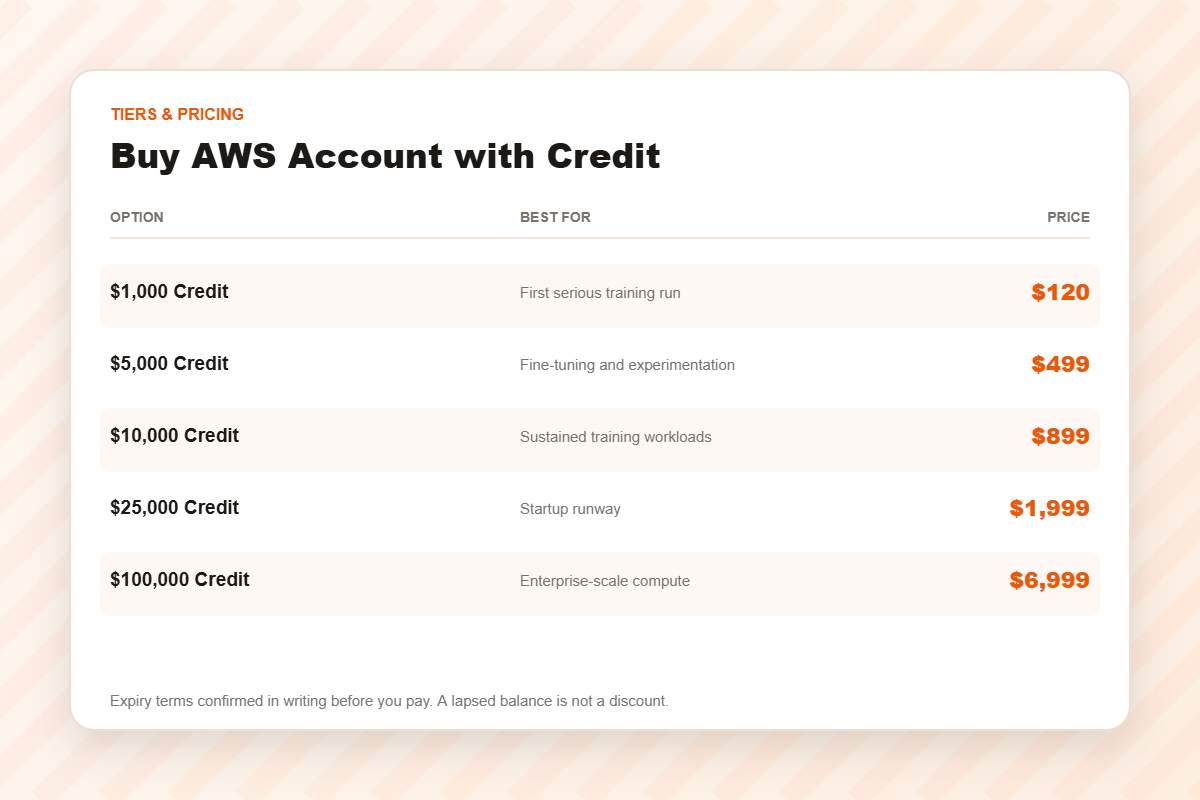
$1,000 Credit — $120
A first serious training run, or a proof of concept that needs real GPUs without a real invoice.
$5,000 Credit — $499
Where most applied-AI teams land. Meaningful fine-tuning without watching the meter hourly.
$10,000 Credit — $899
Sustained training, or a small team running continuous heavy jobs for months.
$25,000 Credit — $1,999
Startup runway — three months of experiments becomes a year.
$100,000 Credit — $6,999
An operating decision, not a purchase. Talk to us, and expect questions.
How to size it in one calculation
Take your realistic monthly AWS spend over the next six months — the number you could defend today, not the one you hope for once the product takes off. Multiply by the months of runway you want. Buy the tier just above.
If that lands under $1,000, you do not need credit at all. Buy the 32 vCPU account at $30 and pay AWS the small bill as it arrives.
Keeping the balance alive
- Tag everything, so you can answer “where did it go” in under a minute.
- Use spot for interruptible work. Training that checkpoints does not need on-demand pricing.
- Set alarms at 50% and 80% of balance. The complaint is never “it ran out” — it is “it ran out unexpectedly”.
- Watch the billing method underneath. When credit is exhausted, billing reverts — and failed billing is the commonest cause of suspension.
Delivery
Automated: median around ten minutes from cleared payment to a working console with the balance showing. If the account is suspended or fails, one message to support and we replace it free.
The first fifteen minutes decide whether it survives
Most sellers hand over credentials and go quiet. We are going to tell you what to do next, even though none of it earns us anything.
- Change the password immediately. The one you were sent has sat in an email inbox. Treat it as compromised.
- Enable MFA on the root user before you deploy anything. Ninety seconds, and it is the highest-value action available to you.
- Create a working user. Living as root every day ends badly for everyone who does it.
- Check the billing settings. Failed billing is the most common cause of suspension, and on a bought account the warning email may go somewhere you cannot read.
- Set a billing alarm — a real one that emails you.
The full sequence is in this checklist. It takes a quarter of an hour and it is the difference between owning this account next year and buying another one next month.
Frequently asked questions
Is the credit real, and can I see it?
Yes — applied before delivery and visible in the billing console at first login. If it is not there, that is a replacement case and we act immediately.
When exactly does it expire?
Ask us for the tier you are considering and we will confirm in writing before you pay. This is the question most sellers avoid.
Has the account been sold before?
No. Once, to you.
What if I only need a little compute?
Then buy a standard tier. Genuinely — the 32 vCPU account is almost certainly right and we would rather you bought it.
Related
32 vCPU · 64 vCPU · 128 vCPU. Credit also available on Azure and Google Cloud. Browse AWS accounts and cloud accounts, or read how to spot a seller who will vanish.
Disclaimer: AWSCreditAcc.com is an independent reseller and is not affiliated with, authorised by, or endorsed by Amazon Web Services, Inc.. All trademarks belong to their respective owners. A cleared account saves you the verification queue; it does not exempt you from the rules. You remain responsible for operating within the platform’s terms of service and for whatever you deploy.
Reviews
There are no reviews yet.